A laptop repair can go wrong in ways that never show up on the invoice, and low-quality thermal putty is one of the quietest examples. It looks the same in the tube, spreads the same way onto the component, and the laptop boots up normally afterward. The difference only becomes obvious weeks or months later, when GPU temperatures start climbing for no apparent reason. This isn't a hypothetical risk either. Counterfeit thermal interface materials are a documented problem in the broader supply chain, not just a theoretical concern raised by repair shops trying to sell a premium service.
What Is Thermal Putty and Why Is It Important for Laptop Cooling?
Thermal putty is a thick, moldable thermal interface material used specifically where thermal paste isn't suited, primarily on GPU VRAM chips and VRM (voltage regulator module) components, which sit at uneven heights relative to the main heatsink. Genuine putty products used in laptop repair typically fall in a thermal conductivity range of roughly 3 to 17 W/mK depending on the specific formulation, several times higher than the common thermal pads it's designed to replace. Where the correct putty isn't used, or where a low-quality substitute is, these components lose their intended cooling path, even though the laptop may look and initially function completely normally.
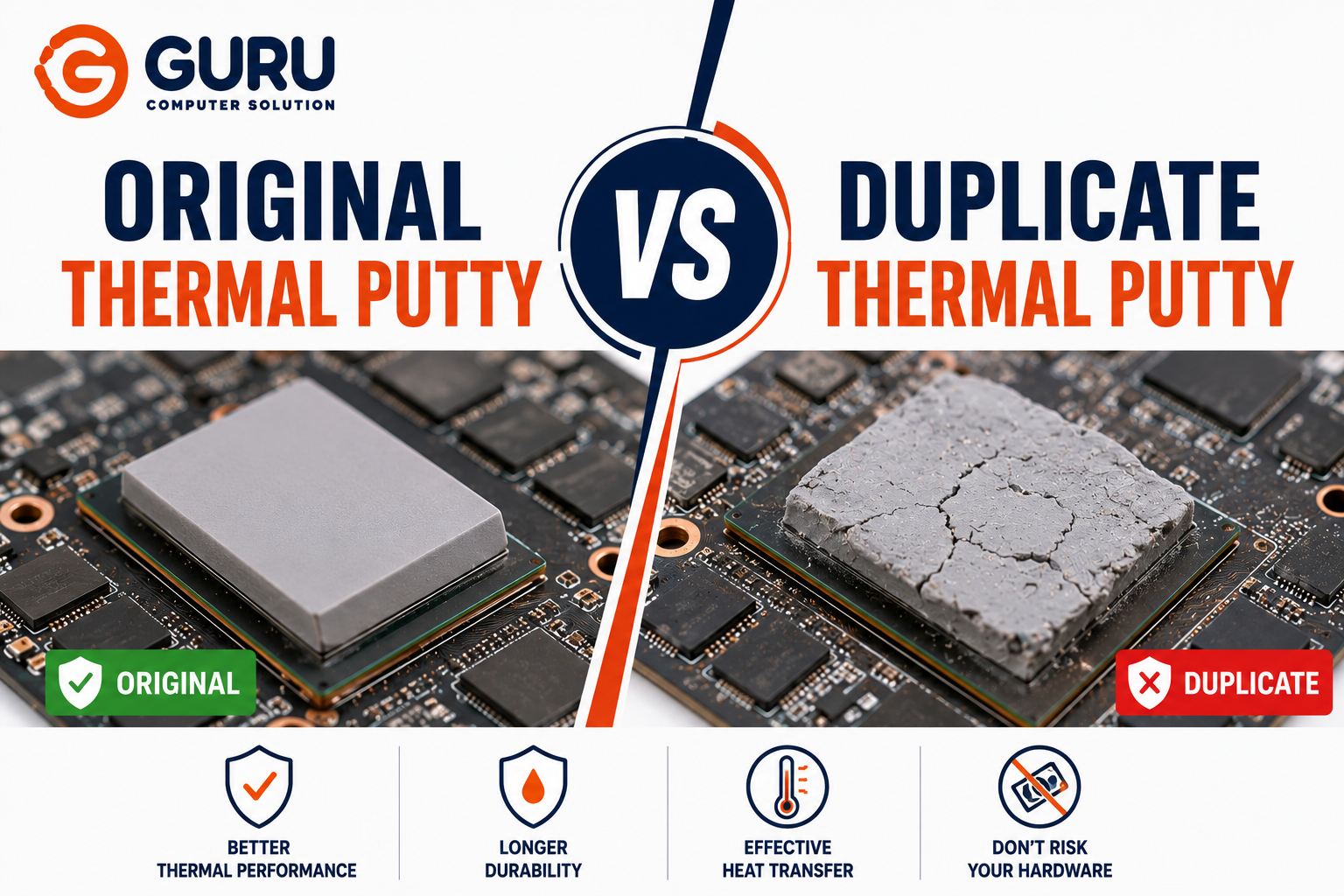
Original vs Duplicate Thermal Putty: What's the Difference?
Original (genuine) thermal putty is manufactured to a tested, consistent formulation, with verified non-conductive properties for safe use near exposed circuitry and a texture engineered to hold its shape under clamping pressure without drying out over the laptop's service life.
Duplicate or counterfeit thermal putty is a substitute product, sometimes sold under a copied brand name or packaging, sometimes a generic, unverified compound claiming similar specifications without the manufacturing consistency or testing behind those claims.
Even among genuine, legitimately branded products, advertised numbers deserve scrutiny. This is a subtlety worth understanding: independent lab testing of thermal interface materials has repeatedly shown that bulk thermal conductivity numbers printed on packaging do not reliably predict real-world performance. Effective heat transfer depends on the interface layer's actual behavior under pressure, at real bond-line thickness, not just the raw material's lab-measured conductivity in isolation. This matters here because it means a counterfeit product can be built specifically to mimic a plausible-looking conductivity number while performing far worse in practice, since bulk conductivity claims are the easiest spec to fake convincingly.
There is documented precedent for organized counterfeiting in this exact product category. Investigative reporting has traced cases of counterfeit thermal compounds entering the distribution supply chain under a legitimate manufacturer's branding, deceiving even established resellers who believed they were sourcing authentic product. This isn't a fringe risk specific to obscure sellers. It has affected recognized brands in the thermal interface material industry.
Why Cheap Thermal Putty Can Cause Laptop Overheating
Thermal conductivity is the entire point of the material, its ability to move heat from a hot component to the heatsink above it. A duplicate or low-quality putty with genuinely lower real-world conductivity than advertised does the same physical job less effectively, even though it's been applied correctly and looks identical to the genuine product.
This creates a particularly deceptive failure pattern. The repair appears successful immediately afterward, since the laptop powers on and functions normally in casual use. The actual problem only surfaces under sustained load, gaming, rendering, extended use, when the affected components need to shed real heat and the substandard material can't keep up. This delay between the service and the symptom is exactly why low-quality thermal putty often goes undetected until temperatures have already been elevated for weeks or months.
How Counterfeit Thermal Putty Damages GPU VRAM and VRM Components
GPU VRAM running consistently hotter than intended, due to inadequate heat transfer, doesn't always announce itself as a dramatic failure. It more commonly shows up first as graphical artifacts, texture corruption, or instability specifically during graphics-intensive tasks, symptoms frequently misattributed to a driver issue rather than a cooling one.
VRM components running hot due to poor thermal transfer can trigger performance throttling as the system tries to protect itself, or in more serious cases, accelerated degradation of the power delivery components themselves, turning what should have been routine maintenance into a cause of premature component wear.
The compounding risk is that because the symptoms of counterfeit-putty-related overheating look similar to several other causes (dust buildup, degraded thermal paste, aging hardware), the actual root cause, a substandard repair, can go unidentified through multiple further diagnostic attempts, adding cost and frustration before the real issue is found.
Warning Signs Your Laptop May Have Low-Quality Thermal Putty
- GPU temperatures climbing noticeably within weeks or months of a thermal service, despite the repair being reported as complete
- Graphical artifacts or texture glitches appearing specifically under graphics-intensive load, without a clear software cause
- Thermal throttling or performance drops that weren't present immediately after the service but developed over subsequent weeks
- Louder fan noise under the same workloads that previously ran quieter
- Sudden shutdowns under sustained gaming or rendering load, especially if this pattern emerged shortly after a repair involving the GPU area
How to Verify Thermal Putty Is Genuine Before It's Applied
If you're sourcing thermal putty yourself, or want to understand what a technician should be checking, these are concrete, practical verification steps rather than vague reassurances.
Check the price against the realistic market range. Genuine, reputable thermal putty products are not the cheapest listing available. A price dramatically below the typical range for a known brand and quantity is one of the strongest and simplest warning signs, particularly on open marketplaces with many competing sellers.
Check consistency against the manufacturer's description. Genuine putty should match the described texture, typically a smooth, moldable, non-stringy compound. Product that's noticeably too runny, too stiff, or visibly grainy compared to the manufacturer's own description is a red flag.
Check for batch or verification codes where the manufacturer provides them. Some manufacturers include alphanumeric batch codes on packaging that can be cross-referenced against official verification pages or established user communities. Products missing an expected code, or with a code that doesn't verify, warrant caution.
Weigh the product against the stated quantity, where practical. Underfilled tubes or containers are a common, low-effort counterfeiting shortcut, since reduced fill volume is easy to disguise in packaging but not on a scale.
Be skeptical of an unusually high advertised conductivity number as the sole selling point. As covered above, even genuine manufacturers have moved away from leading with bulk conductivity claims because they're an easy number to inflate and a poor predictor of real-world performance on their own.
Why Professional Laptop Technicians Never Compromise on Thermal Materials
For a technician, thermal material cost is a small fraction of the overall repair, but its impact on the outcome is disproportionately large. Using genuine, verified thermal putty isn't a premium upsell. It's the baseline requirement for a repair that actually holds up under real usage rather than just passing an immediate post-repair test. A reputable technician treats sourcing verified materials, from suppliers with a traceable, accountable distribution channel, as a non-negotiable part of doing the job correctly.
How Guru Computer Solution Identifies and Replaces Poor-Quality Thermal Putty
Assessment of existing material. When a laptop comes in with unexplained GPU-area overheating, especially following a prior repair elsewhere, we inspect the existing thermal putty's condition and application quality as part of the diagnostic process.
Sourcing from verified, traceable suppliers. We use thermal putty sourced through channels we can verify, applying the same price sanity checks and consistency verification described above, rather than the cheapest available option with unconfirmed specifications.
Correct application to specification. Matching the putty thickness and coverage to the actual component gap, rather than a generic, one-size-fits-all approach.
Load testing after service. Confirming temperature behavior under sustained load before the laptop is returned, not just a brief post-service power-on check, since substandard material failures often only reveal themselves under real load.
How to Protect Your Laptop from Fake Thermal Putty
Ask what specific material and brand is being used before agreeing to a thermal service, and don't hesitate to ask about the source if GPU-area cooling is part of the job.
Be cautious of unusually cheap thermal servicing quotes, particularly for gaming laptops where VRAM and VRM cooling genuinely matters. A price significantly below the local market rate for a full thermal service is worth questioning, for the same reason an implausibly cheap thermal putty listing is worth questioning.
Monitor GPU and VRM temperatures for a few weeks after any thermal service, using a monitoring tool during normal use, rather than assuming the job is done simply because the laptop worked immediately afterward.
Choose a technician who can speak specifically to material sourcing, not just service speed. This conversation itself is often a reasonable indicator of whether proper materials are actually being used.
Why Investing in Original Thermal Putty Saves You Money in the Long Run
The cost difference between genuine and substandard thermal putty is small relative to the overall service cost. The cost difference between a repair that holds up and one that has to be redone, potentially after GPU or VRM damage has already occurred from months of inadequate cooling, is not small at all. A repeat repair means paying for disassembly and labor twice, and in the worse cases, addressing component damage that a properly executed first repair would have prevented entirely. Genuine material upfront is consistently the cheaper outcome once the full picture, not just the initial invoice, is considered.
Trust Guru Computer Solution for Genuine Thermal Maintenance in Kathmandu
We treat thermal material quality and verified sourcing as a core part of doing the repair correctly the first time, not an area to cut cost on. If your laptop is showing signs of overheating following a previous thermal service, or you want thermal maintenance done with verified materials from the start, we're built to get it right.
Frequently Asked Questions (FAQs)
What Is Thermal Putty Used for in a Laptop?
Thermal putty is used primarily on GPU VRAM chips and VRM components, filling the uneven gaps between these parts and the heatsink to transfer heat effectively, in situations where thin thermal paste isn't suited to the gap size.
What Is the Difference Between Original and Duplicate Thermal Putty?
Original thermal putty is manufactured and tested to a verified, consistent formulation, sourced through a traceable supply chain. Duplicate or counterfeit putty may claim similar specifications without that manufacturing consistency or accountable sourcing, often performing below its advertised rating in real use.
Can Duplicate Thermal Putty Cause Laptop Overheating?
Yes. If the actual real-world thermal conductivity is lower than advertised, heat transfer from VRAM or VRM components to the heatsink is reduced, which can lead to elevated temperatures, throttling, or instability, even though the repair initially appears successful.
How Can I Tell If My Laptop Has Low-Quality Thermal Putty?
The clearest signal is GPU-area overheating symptoms, artifacts, throttling, or rising temperatures, developing weeks or months after a thermal service rather than being present immediately. Direct visual inspection isn't reliable, since genuine and counterfeit putty look similar.
Does Cheap Thermal Putty Affect Gaming Laptop Performance?
Yes, often more noticeably than on lighter-use laptops, since gaming workloads push VRAM and VRM components to generate more sustained heat, exposing inadequate thermal conductivity faster than casual use would.
How Often Should Thermal Putty Be Replaced?
Genuine, quality thermal putty is generally formulated to last the practical service life of the laptop without needing routine replacement, unlike thermal paste. Replacement is typically only necessary if the original application was poor quality, damaged, or contaminated.
Can Thermal Paste Replace Thermal Putty?
Not effectively in most cases. Thermal paste's thin consistency isn't designed to bridge the larger, uneven gaps that putty is built for, particularly around VRAM and VRM components sitting at different heights than the main die.
Why Is GPU VRAM Cooling So Important?
VRAM handles constant high-speed data transfer during graphics-intensive tasks and generates real heat doing so. Inadequate cooling can cause graphical artifacts, instability, or accelerated wear, and these symptoms are frequently misattributed to software issues rather than a hardware cooling problem.
How Does Guru Computer Solution Replace Thermal Putty?
We assess the existing material's condition, source verified thermal putty from traceable suppliers rather than the cheapest unconfirmed option, apply it matched to the specific component gap, and load-test the system afterward to confirm actual thermal performance before returning the laptop.
Is Thermal Putty Replacement Worth the Cost?
Yes, particularly when using genuine materials. The cost difference between quality and substandard putty is small relative to the cost of a repeat repair or potential component damage from months of inadequate cooling.
Which Laptop Brands Commonly Need Thermal Putty Replacement?
Gaming-focused laptops most commonly need proper thermal putty attention given their higher sustained thermal loads. This includes ASUS gaming laptops, MSI gaming models, Acer Predator, Lenovo Legion, HP Omen, and Dell G Series laptops.
Why Choose Guru Computer Solution for Genuine Thermal Putty Replacement?
We source verified thermal materials from traceable suppliers rather than the cheapest unconfirmed option, apply them to proper specification, and load-test results afterward, addressing the actual gap that counterfeit or substandard materials create rather than just completing the service on paper.