A flickering laptop screen is one of the most frustrating display problems users encounter. Whether you're working, attending online classes, gaming, or watching videos, constant screen flickering can reduce productivity and strain your eyes. While many people assume the screen itself is faulty, the real cause could be the display cable, graphics processor (GPU), inverter (for older laptops), display driver, or even the LCD panel.
Diagnosing the exact cause is important because replacing the wrong component wastes both time and money. Understanding the symptoms can help determine whether the issue is software-related or requires hardware repair.
At Guru Computer Solution, we provide professional laptop display diagnostics and repair services in Nepal. Our experienced technicians accurately identify the root cause of screen flickering and provide reliable repair solutions using quality replacement parts.
What problem is the customer facing?
The laptop screen randomly flickers, flashes, or blinks while using the device. Sometimes the display becomes unstable only when moving the screen, while in other cases it flickers continuously from startup. Some users also notice horizontal or vertical lines, brightness fluctuations, or temporary black screens.
Ignoring these symptoms may lead to complete display failure or additional hardware damage.
Why Does It Happen?
Laptop screen flickering can occur due to several hardware and software issues, including:
- Loose or damaged LCD/eDP display cable
- Faulty LCD or LED display panel
- Failing dedicated or integrated GPU
- Faulty inverter board (older CCFL display laptops)
- Corrupted or outdated graphics drivers
- Incorrect display refresh rate settings
- Physical impact or liquid damage
- Motherboard display circuit problems
- Overheating graphics chip
- Manufacturing wear after years of use
How can customers identify the issue?
If the GPU is faulty:
- Flickering appears on both the laptop screen and external monitor.
- Colored artifacts or random blocks appear.
- Laptop freezes during graphics-intensive tasks.
- Blue Screen (BSOD) or random crashes occur.
If the Display Cable is faulty:
- Flickering changes when opening or closing the laptop lid.
- Screen turns black at certain angles.
- Display cuts in and out randomly.
- Horizontal or vertical lines appear intermittently.
If the Inverter is faulty (Older Laptops):
- Screen becomes very dim.
- Backlight flashes repeatedly.
- Display is visible only with a flashlight.
- Screen brightness fluctuates constantly.
Other common symptoms:
- Random screen blinking
- Brightness changes automatically
- Display distortion
- Temporary black screen
- Ghosting or flashing images
Possible solutions.
Step 1: Rule Out Software Problems
- Update graphics drivers.
- Boot into Safe Mode.
- Change the display refresh rate.
- Install Windows updates.
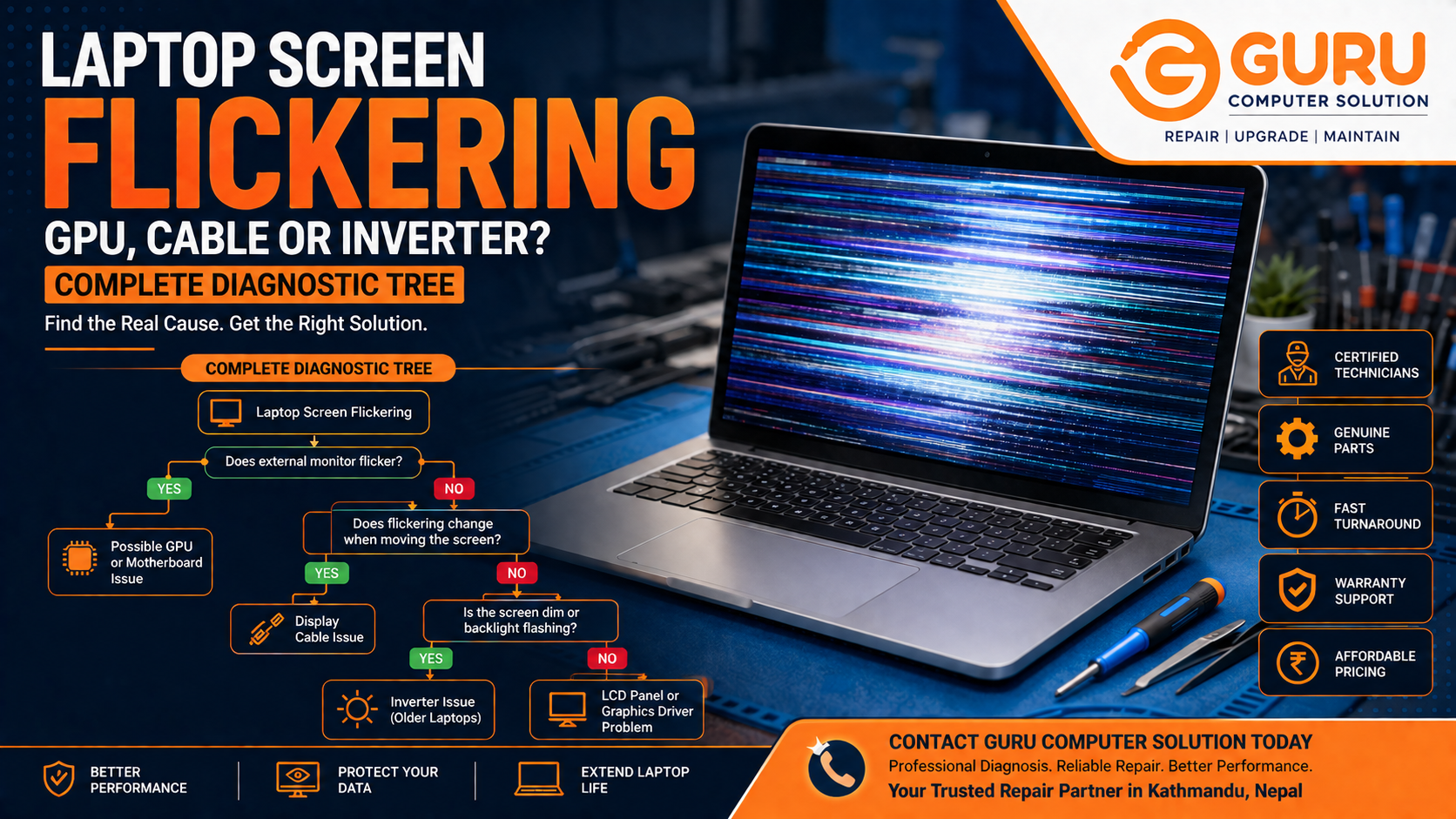
Step 2: Test External Display
- Connect an external monitor.
- If both displays flicker, the GPU or motherboard may be faulty.
- If only the laptop screen flickers, the LCD panel or display cable is more likely the issue.
Step 3: Check Display Cable
- Inspect the LCD cable for damage.
- Replace loose or worn-out cables.
- Reseat internal display connectors.
Step 4: Inspect the LCD Panel
- Test the screen using professional diagnostic equipment.
- Replace the display panel if necessary.
Step 5: Diagnose GPU and Motherboard
- Perform hardware diagnostics.
- Repair or replace damaged GPU components when possible.
- Repair motherboard display circuitry if required.
Step 6: Replace Inverter (Older Models)
- Replace the faulty inverter board if the laptop uses a CCFL backlit display.
Why Choose Guru Computer Solution?
Guru Computer Solution has been providing trusted laptop repair services in Kathmandu since 2010. Our technicians specialize in diagnosing complex display issues and repairing laptops from all major brands.
Certified Technicians
Experienced professionals with advanced diagnostic tools.
Genuine Parts
We use high-quality display panels, cables, and replacement components.
Fast Turnaround
Most display diagnostics and repairs are completed quickly.
Warranty Support
Warranty available on eligible replacement parts and repair services.
Affordable Pricing
Transparent pricing with reliable service and no hidden charges.
Contact Guru Computer Solution Today
If your laptop screen is flickering, flashing, or showing display problems, don't ignore the warning signs. Visit Guru Computer Solution for professional diagnostics, expert display repairs, genuine replacement parts, and fast service in Kathmandu.